

Your best jobs call while your hands are inside a wall. The homeowner with a burst pipe or a dead panel doesn't leave a voicemail - she hangs up and dials the next company in the search results, and the $400 job is gone before you're out of the crawlspace. An AI receptionist exists to close exactly that gap. We build one, so read this the way you'd read a quote from a contractor who wants the work: below is what it genuinely does well for the trades, what it costs, and the calls it still fumbles.
Our articles are still written by humans!
Get human written articles in your Google feed.
The math of a missed call
Every trade business knows the feeling: you climb out from under a sink, check the phone, and there are two missed calls and no voicemails. Those weren't telemarketers. Somebody with water where water shouldn't be called you first, got nothing, and called the next company. The classic Harvard Business Review research on lead response found that the odds of a meaningful contact collapse within the first hour. For a homeowner standing in a flooding kitchen, the window isn't an hour - it's the four rings before your voicemail greeting starts.
Now do the arithmetic that matters. A routine service ticket in most trades runs a few hundred dollars; a water heater, a panel upgrade, or a full repipe runs into the thousands, and the customer behind it may come back for a decade. An AI receptionist costs roughly what one hour of billable work brings in per month - we break the market down honestly in our AI receptionist pricing guide. Miss one real job a month and you're not saving money by sticking with voicemail; you're paying for a service you don't have.
What it actually does for a home-services business
Strip the marketing and a properly configured AI receptionist does six concrete things on a trades call:
- Answers instantly, every time- including the three calls that arrive at once during a storm, and the ones that come in while you're invoicing at 8 p.m.
- Screens the service area before booking.It asks for the address early, checks it against the ZIP codes and towns you actually cover, and politely declines the rest. Every out-of-area booking it prevents is a drive you didn't waste.
- Books with the details a dispatcher would get: full address, callback number, what's broken and since when, gate code or lockbox, dog in the yard, tenant or owner, photos requested by text where that helps.
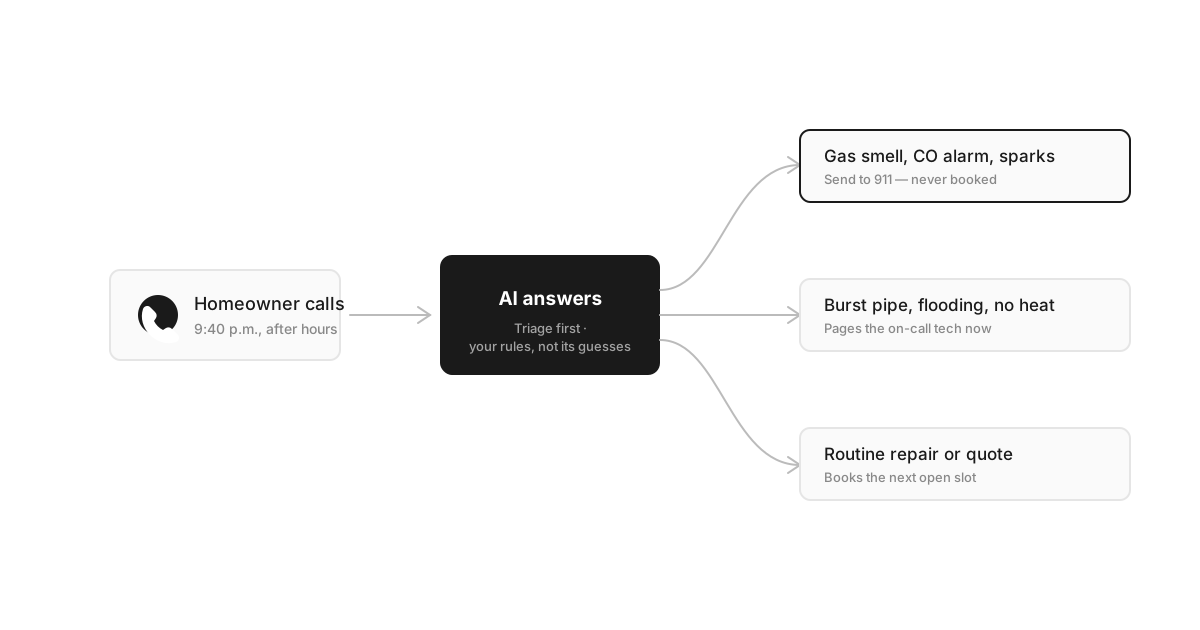
- Triages urgent from routineusing your definitions - "water actively flowing" pages the on-call tech, "dripping since March" books Thursday.
- Captures quote requeststhat aren't bookable yet - scope, timeline, budget hints - so you call back with context instead of playing phone tag from scratch.
- Follows up by text: confirmation with the arrival window, and, if you want it, the after-job review ask that most crews forget by the next job.
Notice what's not on the list: diagnosing the furnace, quoting a repipe sight unseen, or negotiating price. The AI's lane is getting the right job, with the right details, onto the right schedule. The wrench stays yours.
Trade-by-trade differences that matter
"Home services" is a lazy umbrella. A cleaning company and an electrician don't share an emergency definition, an intake form, or a busy season - and an AI receptionist configured generically will feel generic to callers. Here's how the setup actually differs across the five trades we see most:
How AI receptionist setup differs by trade
| Trade | What “emergency” means | Intake that matters | Seasonal spike |
|---|---|---|---|
| Plumbing | Burst pipe, sewer backup, water actively flowing | Shutoff valve located? Fixture, symptom, water heater age | First hard freeze - burst-pipe week |
| Electrical | Sparking, burning smell (911 first), whole-house outage | Breaker vs. whole house, panel age and access | Storm season and holiday overloads |
| HVAC - see our dedicated HVAC answering service guide | No heat in a freeze, no cooling in a heat wave | System type and age, maintenance-plan status | First heat wave, first freeze |
| Cleaning | Rare - move-out deadlines and lockouts at most | Square footage, pets, supplies, keys and access | Move-out season, spring deep cleans |
| Landscaping | Storm-downed limb on a roof or a line | Lot size, gate width, recurring vs. one-time | Spring rush, post-storm cleanup |
The pattern: the more a trade deals in genuine emergencies, the more the triage rules matter; the more it deals in recurring visits, the more the intake and access details matter. Configure for your column, not for "home services."
Live answering vs AI vs hybrid
There are three honest ways to stop missing calls, and AI is not always the right one. Here's the comparison we'd want if we were buying:
Answering options for a home-services business
| Model | Best fit | Watch out for |
|---|---|---|
| Live answering service | High-touch commercial work, complex B2B jobs, owners who want a human on every call no matter what | Per-minute pricing that spikes in season, hold queues when a storm hits, operators reading a generic script who can't book into your calendar |
| AI receptionist | High after-hours and overflow volume, repetitive intake, small crews with nobody at a desk | Must be configured for triage, service area, and life-safety escalation - out of the box it knows nothing about your trade |
| Hybrid (AI first, human backup) | Most growing shops: AI catches every call and handles the routine majority, a person takes the delicate ones | You must define exactly what triggers the handoff and who receives it, or the AI holds calls it should release |
Where live services genuinely win: a caller negotiating a $40,000 commercial contract, a property manager with a portfolio problem, a grieving family calling about a flooded estate house. Those calls deserve a person from the first ring. If that's most of your phone traffic, buy the live service - or route those numbers to a human and let the AI take the rest.
Emergency calls: the part to configure first
This is the section to read twice, because it's where a lazy setup does real damage. Home-services phones receive two kinds of "emergency," and they must be handled differently - by rule, not by vibe.
Life-safety calls are never bookings
A gas smell, a carbon-monoxide alarm, smoke, a sparking panel, a downed power line: the only correct script is "leave the house now and call 911 or your gas company from outside." The AI must not troubleshoot, must not offer a morning slot, and must escalate to a human immediately after. If a vendor can't show you this hard stop working on a test call, walk away - this is the one rule where a miss becomes a news story.
Business emergencies get paged, not queued
A burst pipe, sewage coming up a drain, no heat with a toddler in the house in January: these are bookings, but not Thursday bookings. The AI flags them urgent, pages the on-call tech with the address and a one-line summary, and tells the caller exactly what happens next - "a tech will call you back within the hour" beats "someone will get back to you" every time.
Everything else books normally
The dripping faucet, the quote for a fence line, the fall gutter clean: straight onto the calendar, confirmation by text, no drama. The skill is keeping the three lanes separate at 2 a.m. with a stressed caller talking over the greeting - which is why you write the definitions down instead of hoping.
Setup in an afternoon
A realistic first deployment is an afternoon of decisions, not a month-long IT project. The order matters:
- Write the rules before touching software.Your service area by ZIP or town. Your two emergency lists - life-safety and page-the-tech. The intake fields each job type needs. This is a page of notes, and it's the actual product; everything after is plumbing.
- Start from a working prompt, not a blank box. Our copy-paste AI receptionist prompts include the after-hours and emergency-triage templates - swap in your trade's specifics instead of writing from scratch.
- Forward after-hours and overflow calls only. Nights, weekends, and the calls that ring out while you're on a job were all going to voicemail anyway - pure upside while you judge the quality on real calls. Keep answering what you can.
- Connect the calendar and test it yourself. Book a fake job through your own number: does the address land in your scheduling tool, does the confirmation text arrive, does a fake gas smell trigger the 911 script? Trust the test, not the demo.
- Read the first two weeks of transcripts.Fix the specific lines where it stumbled, tighten the service-area answers, and treat it like a new hire in week one - because that's what it is.
Where it will disappoint you
We sell this product, so weight the following accordingly - it's the list our own support tickets are made of:
- The rambling multi-property call.A landlord with three buildings, two tenants' complaints, and a story about each will produce a muddled intake. A good AI captures a callback and the gist; it won't untangle the portfolio. A human callback finishes that job.
- Price hagglers. The AI can state your service-call fee and your ranges. It cannot read a caller, hold a line, or split a difference - and letting it try is how you end up honoring a discount you never offered. Route negotiation to a person, always.
- Furious customers. Day three of a callback about the same leak is not an intake problem. A polite AI reads as a stall to someone who wants accountability; those calls should hand off to a human early, by rule.
- Callers who simply want a human.Some percentage will hang up on any AI, disclosed or not. Disclosure is still the right call - it's honest, it defuses the "is this a robot" moment, and it's in line with the FTC's guidance on clear disclosure. Budget for losing a few of these callers; you were losing all of the voicemail ones.
If your call volume is tiny and personal, or your work is high-touch commercial, this product is the wrong spend - we'd rather say that here than in a refund email. For everyone else in the trades, the decision usually comes down to one number: how many calls rang out last month. Our buyer's guide covers how to evaluate any vendor, including us. When you're ready to hear it on your own phone, see how our AI receptionist handles a trades call and check the pricing and setup- then judge it the way you'd judge a new hire: on the calls.
Frequently asked questions
What is an AI receptionist for home services?
It's an AI phone agent that answers your business line when you can't - on a roof, in a crawlspace, after hours - and does the front-desk work on the spot: greets the caller, checks that the address is inside your service area, captures the job details, books a slot on your real calendar, and texts you a summary. For true emergencies it follows your triage rules and pages whoever is on call instead of booking. It replaces voicemail and missed calls, not your judgment about the work itself.
How much does an AI receptionist cost for a home service business?
Most AI receptionists run roughly $30 to $300 a month depending on call volume, which is a fraction of a live answering service and a rounding error next to a part-time office hire. The more useful math is against your average ticket: if a typical job is worth a few hundred dollars and a replacement or install runs into the thousands, one call that would have gone to voicemail usually pays for months of service. Watch for per-minute pricing - a seasonal spike can make it expensive exactly when you need it most.
Can an AI receptionist collect the address, gate codes, and access details?
Yes, and for home services this is the feature to test hardest before you buy. A booking without a full service address, a callback number, and access notes - gate code, lockbox, dog in the yard, which unit - is a message, not a job. A good setup asks for these in order, confirms the address back to the caller, and screens it against your service area before offering a time, so you never drive forty minutes to discover the job was never yours to take.
What happens when a caller has a real emergency, like a gas smell or a burst pipe?
A well-configured AI sorts these into two very different buckets. Life-safety calls - gas smell, carbon-monoxide alarm, sparking panel, smoke - get one script only: leave the house and call 911 or the gas company; the AI never books them and escalates to a human immediately. Business emergencies - burst pipe, flooding, no heat in a freeze - get flagged urgent and paged straight to your on-call tech with the address and details, instead of sitting in a voicemail queue until morning. You define both lists during setup, and you should do it before anything else.
Is an AI receptionist worth it for a one-truck operation?
A solo operator arguably gets the most out of one, because you physically cannot answer while you work and every missed call is your own job lost. The AI catches the calls that arrive mid-job, books the routine ones, and interrupts you only for genuine emergencies. The honest caveat: if you get a handful of calls a week and your customers are all repeat business who will happily text you, voicemail may genuinely be enough. It's the growing shop bleeding new-customer calls that feels the difference immediately.