

We build AI receptionists, so the responsible thing is to hand you the framework we'd use to evaluate any vendor, including the questions that are inconvenient for us to answer. Most buying guides for this category are thinly disguised ads. This one is a checklist: the features that actually matter, the pricing traps that hide in plain sight, how to run a demo that tells you something real, and the red flags that should end the conversation.
Our articles are still written by humans!
Get human written articles in your Google feed.
Start before the feature list
The most common buying mistake isn't picking the wrong vendor. It's shopping for features before you've defined the job. An AI receptionist is not one product; it's a set of jobs (answering, booking, qualifying, message-taking, transferring) and you only need the ones that map to calls you're currently mishandling. (And if you're not yet sure AI is even the right category, start with our comparison of AI receptionists, virtual receptionists, and answering services, then come back.)
So spend ten minutes on this before you compare anyone:
- Name the call you keep losing. After-hours bookings? Overflow during the rush? The same five FAQs eating your day? Leads that go to voicemail and never call back? Write it down. That sentence is your buying criteria.
- Map what happens to a call today.Where does it ring, who picks up, what happens when nobody does, and where does the information end up afterward. You can't evaluate a replacement for a process you haven't described.
- Decide what "handled" means.Booked on the calendar? A text summary in your pocket within a minute? A warm transfer? Be concrete, because this is exactly what you'll test in the demo.

If that photo is your business - plumbing, electrical, HVAC, cleaning - we've written a dedicated guide to the AI receptionist for home services, including the emergency-triage rules the generic advice below won't cover.
What actually matters (and what's noise)
Vendor pages compete on long feature lists, most of which are either table stakes or marketing. Strip it down and there are six things worth scoring, roughly in order of how often they decide whether you'll be happy in six months: capabilities, caller experience, escalation, integrations, compliance, and pricing. The rest is detail hanging off those six. We'll take them one at a time, then turn them into a scorecard you can fill in during a demo.
1. Capabilities: can it do your specific job?
Almost every AI receptionist now answers calls, reads from an FAQ, and takes a message. That's the floor, not a differentiator. The questions worth asking are narrower and tied to your sentence from the section above:
- Can it actually book, not just promise to?Taking a request and emailing you to book it manually is not booking. Confirm it writes to your real calendar, checks availability, and handles reschedules and cancellations, if that's the job you hired it for.
- Can it qualify and route?If a call's value depends on a few questions (new vs. existing patient, emergency vs. routine, service area), the AI should ask them and branch, not treat every caller identically.
- What does it do with what it heard?A captured call is only useful if the summary, contact details, and reason for calling land somewhere you'll see them fast. Texted summary, CRM entry, email: pick what fits your day and confirm it works.
- Languages, hours, multiple numbers. Boring, but if you need Spanish, 24/7, or three locations on one account, find out before you sign, not after.
2. Caller experience: does it feel like a phone call?
This is the hardest thing to judge from a feature list and the easiest to judge by ear, which is why you have to call it yourself. The technology is good now, but "good" varies a lot between vendors on the things callers actually feel:
- Latency.The gap between when you stop talking and when it responds. A second is fine; three seconds of silence makes people say "hello? hello?" and hang up. This is the number-one giveaway of a cheap stack.
- Interruptions.Can you cut it off mid-sentence the way you would a person, and does it stop and listen? Systems that talk over you or can't be interrupted feel robotic no matter how good the voice is.
- Recovery. When it mishears, does it recover gracefully or repeat the same wrong thing? Ask it something slightly off-script and listen to how it fails.
- Voice and disclosure.Natural voice matters, but so does honesty. A brief, natural "I'm an AI assistant" up front costs you almost nothing and prevents the worst caller reaction, which is feeling deceived.
3. Escalation and failure: the part nobody demos
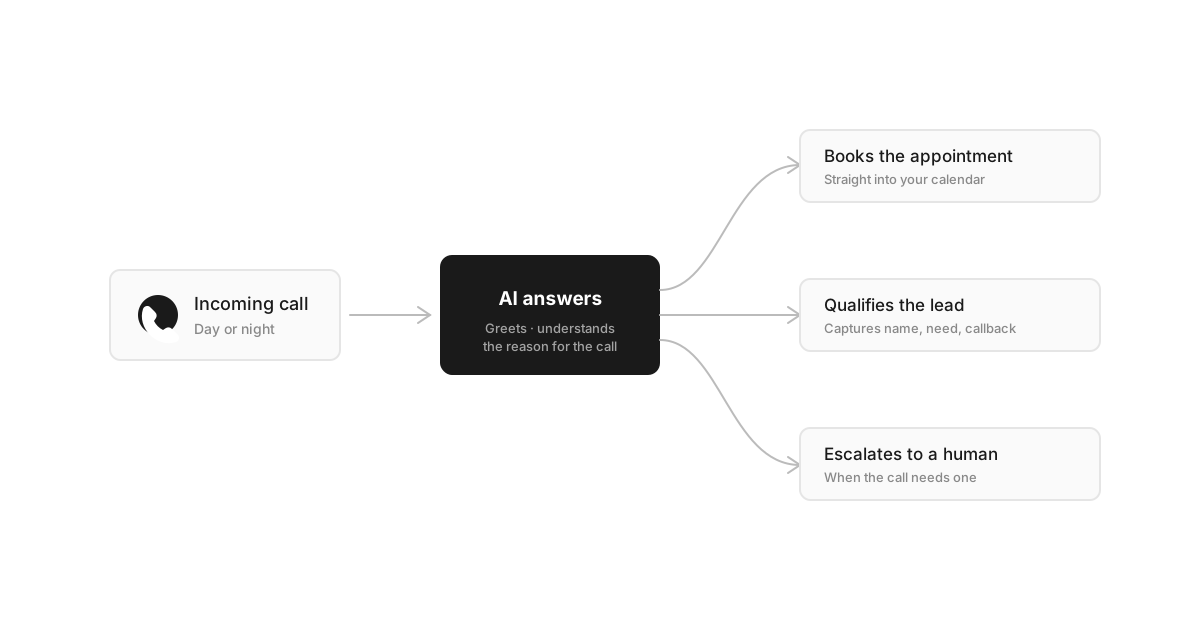
If you read only one section, read this one. Every AI receptionist looks great on the call it was built to handle. The product reveals itself on the call it can'thandle, and that's exactly the moment vendors don't show you. A more capable AI that doesn't know its limits is worse than a modest one that escalates cleanly, because the former traps your callers and the latter just hands them off.
Ask every vendor, plainly:
- What triggers a handoff?Caller asks for a human, repeated misunderstanding, an emotional or out-of-scope call. There should be a real answer, not "our AI handles everything."
- Where does the call go?Warm transfer to whoever's on, a number that rings your cell, or a detailed message texted to you within a minute. "It takes a message" is fine only if you actually get the message fast.
- What does the caller hear during all this? Dead air and loops are how you turn a recoverable call into a one-star review.
4. Integrations: will it fit your stack?
An AI receptionist that can't reach your calendar or CRM is just a fancier voicemail. Match integrations to the job, and be honest that more integration means more setup and more that can break:
- Calendar. Google, Outlook, or whatever you book in. Two-way sync (it sees your availability and writes to it) is the difference between booking and double-booking.
- CRM or practice software.If lead and patient data lives in a specific system, confirm a native integration exists. A "Zapier workaround" is a yellow flag for anything you rely on.
- Your phone system.Can you forward your existing number, keep it, and route only overflow or after-hours to the AI? You shouldn't have to change your number to try a product.
Resist the urge to integrate everything on day one. Start with the one connection that serves your core job (usually the calendar), prove it works, then add the rest.
5. Compliance and disclosure: don't skip this
This is unglamorous and genuinely matters, especially if you record calls or operate in a regulated field. None of the below is legal advice, and the specifics depend on where you are, but a serious vendor should have clear answers:
- Disclosure that it's an AI. Beyond being decent, clear disclosure is the safe default. See the FTC's guidance on clear and conspicuous disclosure for the spirit, and note that regulators are paying increasing attention to AI voices, as the FCC's 2024 ruling on AI-generated voices signaled.
- Call recording and consent. If calls are recorded, some jurisdictions require all-party consent. Ask how the vendor handles recording, storage, and the consent prompt, and check your local rules.
- Data handling.Where does call data live, who can see it, how long is it kept, and can you delete it? If you're in healthcare, ask specifically about a signed business-associate agreement before any patient information touches the system.
6. Pricing, read honestly
Here's the section we have the most incentive to muddy, so let's be blunt. The headline price tells you almost nothing. The pricing modeltells you what you'll actually pay, and the difference shows up exactly when you're busiest.
Pricing models and where they bite
| Model | Good when | Watch out for |
|---|---|---|
| Flat monthly fee | Steady or growing call volume; you want a predictable bill | Caps and overage rates once you exceed included usage |
| Per-minute | Very low, occasional volume | Costs spike in your busy season, exactly when calls matter most |
| Per-call | Short, simple calls | Wrong numbers and spam can still count as billable calls |
| Per-integration / add-ons | You need only one or two connections | A 'cheap' base plan that doubles once you add what you need |
The questions that surface the real number:
- What's the all-in monthly cost at my actual volume? Bring your real call count. Ask them to price that, including the integrations you need, not the demo tier.
- What happens when I go over? Overage rate, hard cap, or the line just stops answering. All three exist; you want to know which.
- What's the real commitment? Free trial, monthly, or an annual lock-in with a setup fee. A confident vendor lets you leave easily.
How to run a demo that tells you something
The vendor's demo is designed to succeed. Yours should be designed to find the edges. Don't evaluate on the scripted walkthrough; get the AI on a real number and try to break it:
- Do the core job. Book an appointment end to end and confirm it actually lands on the calendar and texts you the summary.
- Go off-script.Ask something it wasn't prepped for and listen to how it recovers, or doesn't.
- Be the hard caller. Act annoyed, ramble, change your mind mid-sentence. This is the call that decides your reviews.
- Make the audio messy.Call from a car or a noisy room, talk fast, test an accent if it's relevant to your customers.
- Ask for a human. Then watch the entire escalation path play out. This single test tells you more than the rest combined.
Run at least one of those test calls outside business hours - a vendor's 24/7 claim is checkable at midnight, and our 24/7 AI receptionist guide lists exactly what to probe. If a vendor won't let you trial it on your own number with your own calls, that's information too. And to know what a well-built script should sound like before you judge anyone's demo, skim our AI receptionist prompts and templates first - they're the standard we'd hold any vendor to, including ourselves.
The scorecard
Run each shortlisted vendor through the same grid and score 1 to 5. The weights reflect what actually predicts regret: a perfect voice with a broken escalation path is a bad buy.
AI receptionist evaluation scorecard
| Criterion | What a 5 looks like | Weight |
|---|---|---|
| Capabilities | Does your exact job: real booking, qualifying, summaries where you'll see them | High |
| Caller experience | Low latency, interruptible, recovers from mistakes, discloses it's AI | High |
| Escalation & failure | Clear triggers, real handoff, no dead air or loops | Critical |
| Integrations | Native, two-way connection to your calendar/CRM and your phone number | Medium-High |
| Compliance | Clear answers on disclosure, recording/consent, data, BAA if needed | Medium (high if regulated) |
| Pricing | Predictable all-in cost at your real volume, easy to leave | Medium-High |
Red flags that should end the call
Against our own commercial interest, here's when to walk away from any vendor, us included:
- "Our AI handles everything."No it doesn't. A vendor who won't name the calls their product is bad at either doesn't understand it or is hoping you won't ask.
- No clean way to reach a human. An AI that traps callers with no escape hatch does more brand damage than a missed call ever would.
- Pricing that only appears after a sales call. Opacity early is opacity later.
- No trial on your own number.If you can only hear it on their script, you haven't heard it.
- Vague answers on data and recording."It's all secure" is not an answer.
If you've got your one-sentence job, a scorecard, and a willingness to actually test the failure path, you're better equipped than most buyers in this category. When you're ready to put a candidate through its paces, the simplest test is to point a real call at it and listen. See what our AI receptionist does on a call and how our setup and pricingwork, then judge it on your own calls, the same way you should judge everyone else's.
Frequently asked questions
What's the single most important feature in an AI receptionist?
A reliable escalation path. Capabilities like booking and FAQs are table stakes, and most vendors do them passably. What separates a good AI receptionist from a brand-damaging one is what happens on the call it can't handle: does it warm-transfer to a human, or take a detailed message and text you a summary immediately, or does it loop and trap the caller? Evaluate the failure mode first, not the happy path.
How much should an AI receptionist cost?
Most small-business plans land somewhere between roughly $30 and $300 a month, depending on call volume, integrations, and whether you pay flat-rate or per-minute. The number itself matters less than the pricing model: per-minute billing punishes you in your busy season, while overage charges and per-integration fees can quietly double a 'cheap' plan. Ask for the all-in monthly cost at your real call volume, not the headline price.
Should I pick a general AI receptionist or one built for my industry?
For routine answering and booking, a general-purpose AI receptionist is usually enough and cheaper. Industry-specific tools earn their premium when you need deep integration with sector software (a legal practice-management system, a dental PMS, a home-services dispatch tool) or specialized intake. If your needs are standard, paying for a vertical product mostly buys you marketing copy.
How long does it take to set up an AI receptionist?
Basic answering, FAQs, and message-taking can often be live the same day, sometimes in under an hour. The longer work is integrations (calendar, CRM, your phone system) and tuning the script against real calls. Treat the first two weeks as training: read the transcripts, find where it stumbles, and tighten it. Any vendor promising zero-effort perfection on day one is overselling.
How do I test an AI receptionist before committing?
Call it yourself, several times, and try to break it. Book an appointment, then ask something off-script, then act like an upset customer, then mumble or call from a noisy place. Ask to speak to a human and see what happens. A free trial on your own number with your real call mix tells you far more than a polished sales demo on the vendor's script.