

Google Voice is the cheapest way to give a small business a second phone number, and for a lot of one-person businesses it is the right answer. It is also the source of a steady stream of unhappy Reddit threads, because the free version was never meant for business use and the paid one is a Workspace add-on with features spread over three tiers. This guide is what Google's own help pages say about prices, plans and limits, checked on November 3, 2026. We sell an AI receptionist, which competes with part of what Voice does, so the last section explains where we fit and where we don't.
Our articles are still written by humans!
Get human written articles in your Google feed.
The short answer
Google Voice for business means one of the paid plans: Voice Starter ($10 per user per month, up to 10 users), Voice Standard ($20, unlimited users) or Voice Premier ($30), each sold as an add-on to a paid Google Workspace subscription. It is good at giving a small team cheap business numbers that ring on their phones and laptops. It is weak at what happens when nobody picks up: every plan sends that caller to voicemail. The free plan is for personal use, and Google's rules for it (inactivity reclaim, no 911, no forwarding to automated systems) make it a poor foundation for a business line.
How Google Voice works
A Google Voice number belongs to your Google account, not to a SIM card or a phone line. When someone calls it, Voice rings the places you told it to:
- the Google Voice app on your phone, and voice.google.com in a browser;
- up to 6 linked numbers you have verified, such as your mobile;
- on paid plans, a supported desk phone or an analogue adapter (ATA).
Calls run over the internet. Voicemails are transcribed, US calling is unlimited, and texting is unlimited in the US only. On the business plans, an administrator manages users and numbers from the Google Workspace admin console. Google's calling plan is available in 14 countries: the US, Canada, the UK, Ireland and ten EU and EFTA countries. The free and standalone plans are US only.
Plans and prices
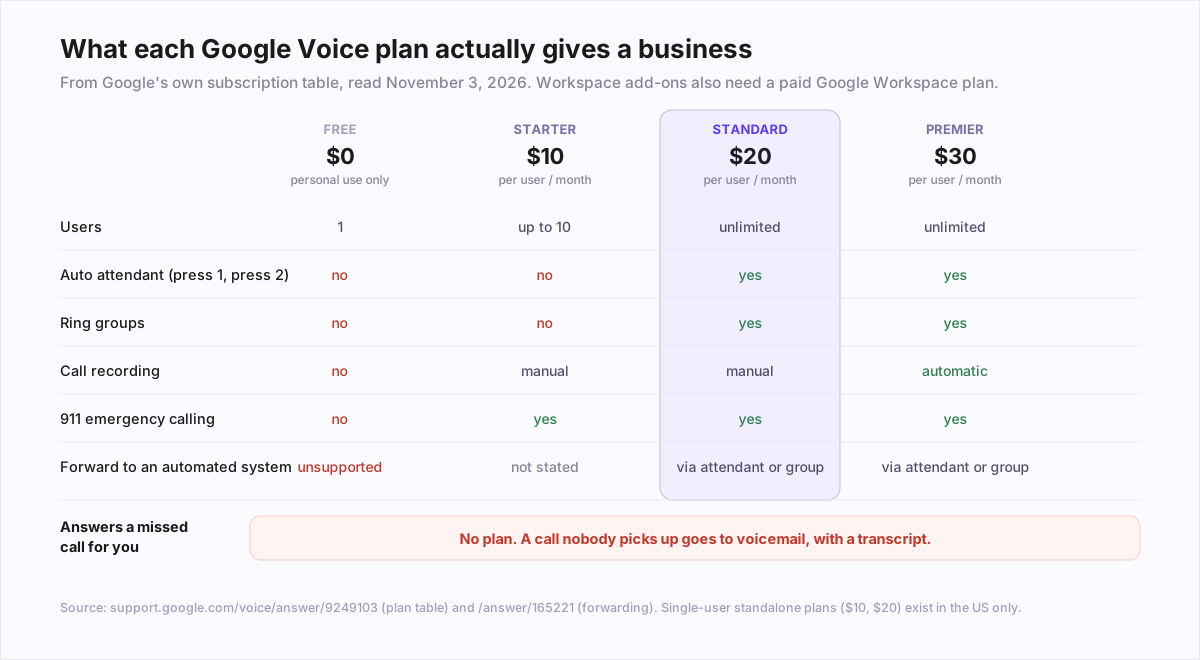
Google Voice plans, US prices from Google's plan table (November 3, 2026)
| Plan | Price | Users | Needs | Notable |
|---|---|---|---|---|
| Google Voice (free) | $0 | 1 | Personal Gmail | Personal, consumer use; US only |
| Voice Starter (standalone) | $10/month | 1 | Personal Gmail | US only; recording, 911 |
| Voice Standard (standalone) | $20/month | 1 | Personal Gmail | US only; adds auto attendant |
| Voice Starter (add-on) | $10/user/month | Up to 10 | Paid Workspace | No auto attendant or ring groups |
| Voice Standard (add-on) | $20/user/month | Unlimited | Paid Workspace | Auto attendant, ring groups, queues |
| Voice Premier (add-on) | $30/user/month | Unlimited | Paid Workspace | Automatic recording, numbers abroad |
Three things the price list doesn't make obvious. First, the add-on prices sit on top of a paid Workspace plan, so a three-person team on Starter pays $30 a month for Voice plus three Workspace licences. Second, Google says Voice subscriptions are available with a monthly flexible plan only, so there is no annual discount. Third, if you read the product page from Europe you may see lower Standard and Premier prices. The page marks those as EMEA-only promotions.
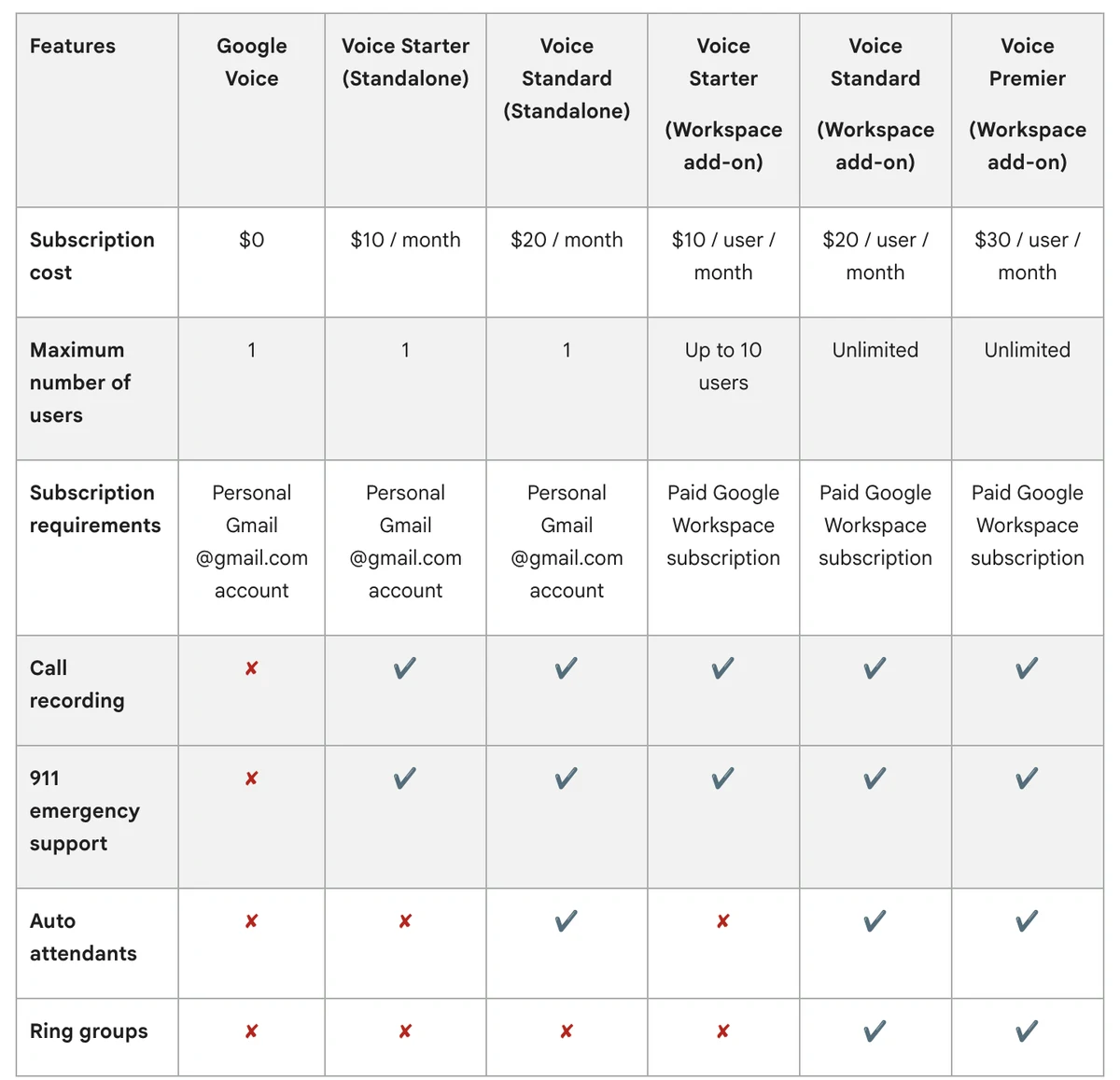
Using free Google Voice for a business
Plenty of sole traders do it. Before you print the number on a van, here is what Google's own pages say about the free plan.
- It is meant for personal use. The plan table describes it as for personal, consumer use. It needs another phone number to link to, and it is US only.
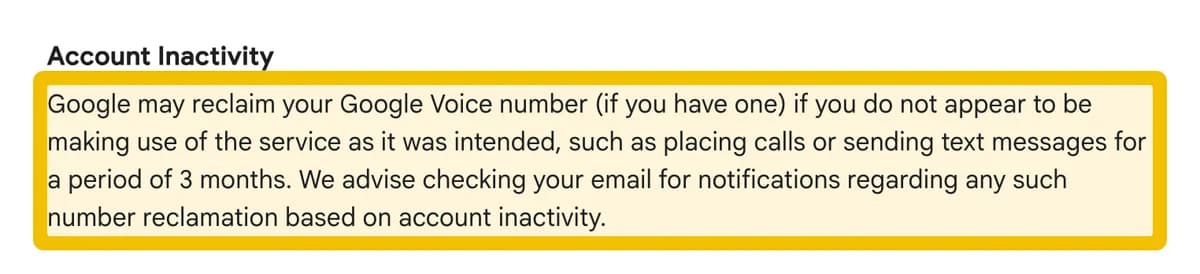
- An unused number gets taken back. Google's acceptable use policy says it may reclaim a number that isn't used for calls or texts for 3 months. After that you have 45 days to get it back. For a seasonal business, that is a real risk.
- No 911. Google says emergency calling is only available on paid Voice accounts, and even then not during a power or internet outage.
- You can't forward it to a bot. This is the one most people find out too late:
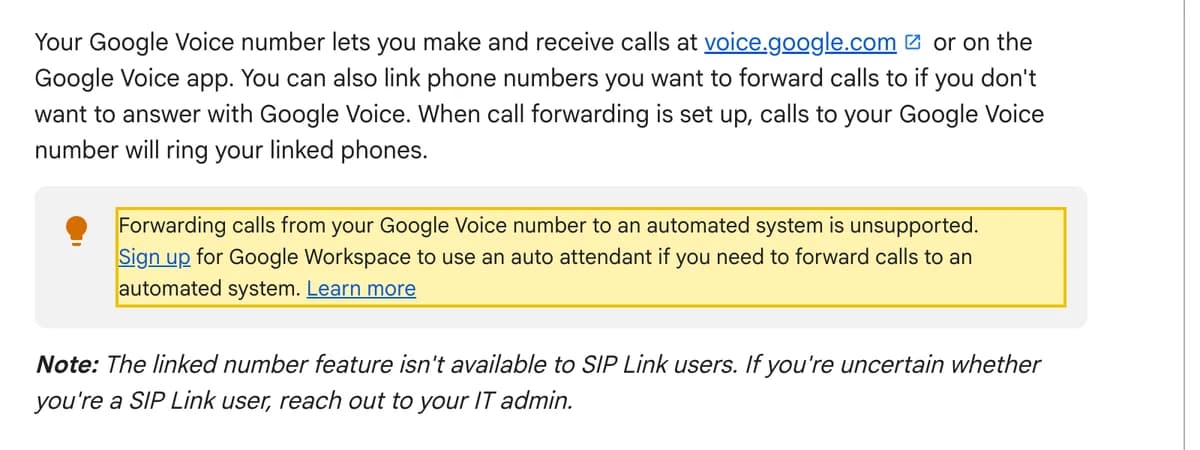
The acceptable use policy adds a second rule in the same direction: "Do not forward to phone numbers that aren't your own or under your control." Texting has limits too. Google says Voice messaging is intended only for 1:1, personal conversations, not bulk sends, and that some banks and subscription services won't send codes to Voice numbers at all.
What the paid plans add
Starter ($10): a shared number with the basics
Up to 10 users, manual call recording, desk phone support and 911. No auto attendant, no ring groups. If two people need to answer the same line, Starter is the wrong tier.
Standard ($20): the first real phone system
This is where Voice gets the features most businesses mean when they say "phone system":
- Auto attendant. A greeting (text-to-speech or your recording), keypad options such as "For support, press one. For sales, press 2.", submenus, business hours, holiday closures and an after-hours action. A caller can be transferred to a user, a ring group, another attendant or another phone number, or sent to voicemail. Google documents keypad input only.
- Ring groups and queues. Ring several people at once, and hold callers in a queue of up to 50 callers with a 30-minute maximum wait.
- SIP Link to connect existing numbers from another carrier.
- Gemini call notes. On Standard and Premier, with a qualifying Workspace plan, Voice can produce the recording, transcript and notes after a call. This feature is available only in English.
Premier ($30): compliance and multi-country
Premier adds automatic call recording, Google Vault retention, BigQuery export of call data, and numbers in countries other than your own. A small business rarely needs it unless it has to record every call.
Porting a number in and out
Google Voice porting, from Google's help pages (November 3, 2026)
| Personal (free/standalone) | Workspace (business) | |
|---|---|---|
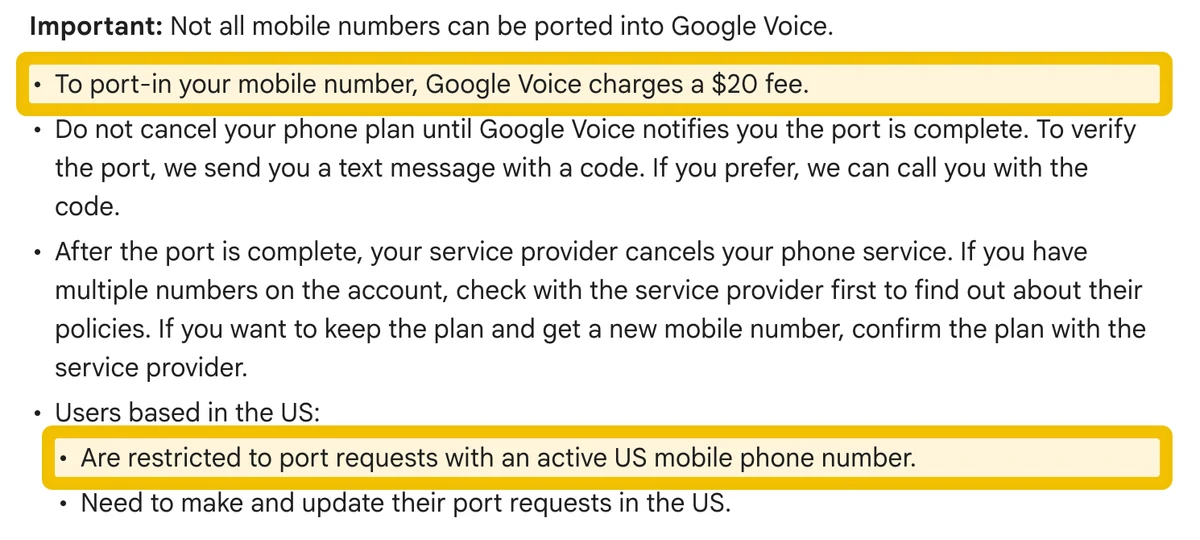
| Fee to port in | $20 | None published |
| Which numbers | Active US mobile numbers only | Up to 1,000 per request (50 in Canada); no toll-free |
| How long | Up to 48 hours (texts up to 3 business days) | 10 to 30 business days in the US |
| Porting out | $3 to unlock, waived if you ported in | Port-out PIN from the admin console |
Two practical notes. A landline cannot be ported into a personal Google Voice account, because Google's personal porting page only accepts an active US mobile number. And Google Voice does not offer 1-800 numbers, so a business that wants a toll-free number needs another provider for it. If you are moving off Voice, our Google Voice alternatives guide compares where the number can go.
What no plan does: answer the call you miss
Every Google Voice plan is built for the case where somebody picks up. When nobody does, at lunch, on a job site or after 6 p.m., the caller reaches voicemail. Voice transcribes it, and Google is candid that voicemail transcripts may be incorrect or missing. The auto attendant routes callers, but it can't understand what they want, answer a question about your hours or prices, or book them in.

That gap is what an answering service or an AI receptionist fills, and the plan you are on decides whether you can connect one:
- Free Voice: not supported. Google says forwarding to an automated system is unsupported. The clean options are to give the answering service its own number, or to move the number to a provider that allows it.
- Standard or Premier: set the auto attendant's after-hours action, or a ring group's no-answer route, to transfer to another phone number: the answering service's line. That is the setup Google documents. Place a test call in each time window before you rely on it.
- Starter: no auto attendant or ring groups, and Google's pages don't say how it treats forwarding to an automated system. Ask Google support before you build on it.
If the missed calls are the real problem, the cheapest first step is often a better voicemail greeting or an automatic text back to every missed call. The difference between a phone menu and something that actually holds a conversation is explained in AI voice agent vs chatbot vs IVR.
Who it fits, and who it doesn't
Is Google Voice right for your business?
| Your situation | Our recommendation |
|---|---|
| One person, answers their own phone, already on Workspace | Voice Starter. Cheap and simple |
| Two to ten people sharing a line, needs 'press 1 for sales' | Voice Standard. Starter has no auto attendant |
| Must record every call for compliance | Voice Premier |
| Sole trader on the free plan, number printed on the van | Move to a paid plan or another provider before the number matters |
| Losing calls at lunch, after hours or on jobs | Voice won't fix it. Add an answering service or AI receptionist on Standard, or use one with its own number |
| Not on Google Workspace, or outside the 14 countries | Look at the alternatives |
Frequently asked questions
Is Google Voice free for business use?
No. Google's own plan table describes the free plan as 'for personal, consumer use'. For a business, Google sells Voice Starter, Standard and Premier as add-ons to a paid Google Workspace plan at $10, $20 and $30 per user per month (US prices, checked November 3, 2026), plus two single-user standalone plans in the US at $10 and $20 a month. The free plan also has no 911 emergency calling, no call recording and no auto attendant, and Google reclaims numbers that see no calls or texts for 3 months.
How much does Google Voice cost for a business?
Voice Starter is $10 per user per month for up to 10 users, Voice Standard is $20 per user per month with unlimited users, and Voice Premier is $30 per user per month. All three are add-ons that need a paid Google Workspace subscription on top, and Google bills Voice monthly with no annual option. In the US, single users without Workspace can buy Voice Starter or Voice Standard standalone at $10 or $20 a month. Prices are Google's US figures as published on November 3, 2026; some EMEA pages show promotional prices.
How does Google Voice work?
Google Voice gives you a phone number that lives in your Google account rather than on a SIM card. Calls to it ring the Voice app, voice.google.com in a browser, a supported desk phone on paid plans, and up to 6 linked phone numbers you have verified. Calls go over the internet, voicemails are transcribed, and texts are supported in the US. Business plans add an auto attendant ('press 1 for sales'), ring groups and call queues on Standard and Premier.
Does Google Voice have an auto attendant?
Yes, on Voice Standard and Voice Premier, not on the free plan or Voice Starter. The auto attendant plays a greeting (text-to-speech or your own recording), offers keypad options, follows business hours and holiday closures, and can transfer the caller to a user, a ring group, another attendant or another phone number, or send them to voicemail. Google's documentation describes keypad menus only. It does not understand a caller's request in their own words or book appointments.
Can I forward Google Voice calls to an AI receptionist or answering service?
Not from the free plan, by Google's own rules. Google's help page says 'forwarding calls from your Google Voice number to an automated system is unsupported' and points you to Workspace and its auto attendant instead. Google's acceptable use policy also says not to forward to numbers that aren't your own or under your control. On Voice Standard or Premier, an auto attendant or ring group can transfer callers to another phone number, which is the supported way to send after-hours or overflow calls to an answering service. Test it before relying on it.
How much does it cost to port a number to Google Voice?
For a personal Google Voice account, Google charges a $20 fee to port in a mobile number, and only an active US mobile number qualifies. Unlocking a Google Voice number so you can port it out costs $3, waived if you originally ported it in. For Workspace accounts, Google's porting pages list no fee, allow up to 1,000 numbers per request (50 in Canada), exclude toll-free numbers, and say a US port takes no less than 10 and no more than 30 business days.
Does Google Voice answer calls with AI?
No. Google's AI features in Voice are spam warnings, voicemail transcription, and on some paid plans call recording transcripts and Gemini call notes, which are English only. None of them answers a caller, takes their details or books an appointment. A call nobody picks up goes to voicemail, and Google itself warns that 'voicemail transcripts may be incorrect or missing'.
Sources
- Google Voice Help: Identify Google Voice subscription types (plan table)
- Google Workspace: Google Voice product page (US plans)
- Google Voice Help: Set up your phone to make and receive calls (linked numbers, automated systems)
- Google Voice: Acceptable Use Policy
- Google Voice Help: Reclaim an expired number
- Google Voice Help: Emergency calling
- Google Voice Help: Port your number to Google Voice ($20 fee, $3 unlock)
- Google Workspace Admin Help: Number porting requirements for Google Voice
- Google Workspace Admin Help: Google Voice porting FAQ
- Google Workspace Admin Help: Set up a Voice automated attendant
- Google Workspace Admin Help: Set up call queuing for a ring group
- Google Workspace Admin Help: How Voice billing works
- Google Workspace Admin Help: Voice and SIP Link supported countries
- Google Workspace Admin Help: Let Google Voice take AI notes
- Google Voice Help: Record calls
- Google Voice Help: Read voicemail transcripts
- Google Voice Help: Send text messages (limits)