

Most voicemail greeting lists give you fifty scripts and no idea how any of them sound. We wrote 25, recorded eight with an AI voice and measured how long each one runs, so you can listen before you copy. We sell an AI receptionist, which is the thing that replaces voicemail; we say where a greeting is the right tool and where it is not.
Our articles are still written by humans!
Get human written articles in your Google feed.
The four parts of a good greeting
Every script in this article is built from the same four parts, in this order. If a sentence does not do one of these jobs, cut it.
What each part does, with an example line
| Part | Its job | Example |
|---|---|---|
| 1. Who | Confirms they dialled the right number | “You've reached Harbor Dental.” |
| 2. What to leave | Gets you the details you need to call back once | “Leave your name, number and address.” |
| 3. When | Tells them how long they will wait, so they don't call a competitor | “We'll call you back first thing in the morning.” |
| 4. If it can't wait | Gives urgent callers a route other than voicemail | “For a burst pipe, call our emergency line at 555-0147.” |
Part 3 is the one most greetings leave out. "As soon as possible" promises nothing; "today", "within the hour" or "by Monday at noon" is something the caller can plan around - and something you have to keep. Part 4 only applies if you have an urgent route; if you don't, leave it out rather than invent one.
How long it should be (we timed it)
We generated the eight greetings below plus one deliberately bad one with two stock voices from ElevenLabs, at 0.9 speed so they would not sound rushed, and measured each audio file.
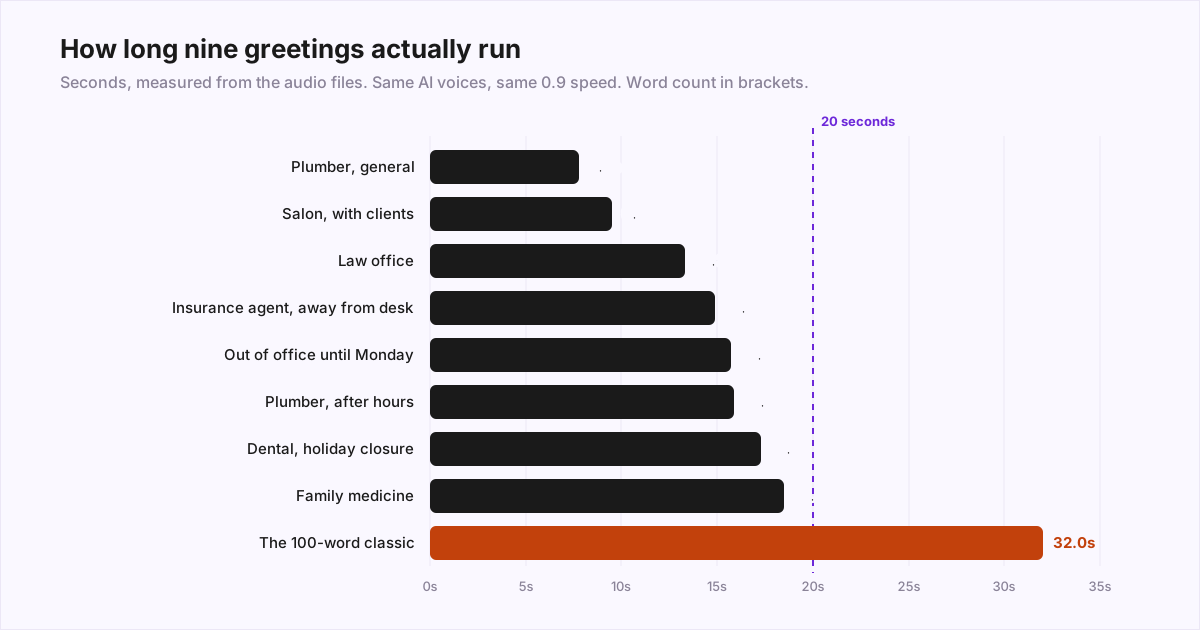
Three things we did not expect:
- Word count predicts length badly. Two 39-word greetings ran 15.7 and 17.3 seconds. Across all eight good ones the voice averaged about 2.8 words a second, but the per-greeting rate ranged from 135 to 217 words a minute.
- Numbers are slow. The greetings with a phone number, a date or opening hours were the slowest per word. "555-0147" is one word on paper and well over a second out loud. That is a reason to keep it, slowly - a number nobody can catch is useless.
- The classic takes twice as long. At 32 seconds the 100-word version runs about double the 40-word ones and adds nothing a caller needs; it just makes them wait longer for the tone.
Our rule from this: aim for about 15 seconds, stay under 20, and time your own recording with a stopwatch. Your pace is not an AI voice's pace.
8 recorded examples
The businesses are invented. Phone numbers use 555-01xx, a range reserved for fiction, so swap in your own.
1. General business greeting
Why it works: It is the shortest of the eight and still does three of the four jobs. 'What's going on' gets you the reason for the call, so your callback starts with an answer instead of a question.
2. After-hours greeting with an emergency line
Why it works: It names what counts as an emergency. 'For emergencies, call…' invites every caller to decide their leaky tap is one; 'burst pipe or no water' does not.
3. Holiday closure
Why it works: It gives the return day, not just 'closed for the holiday'. Set a reminder to switch it back: a Thanksgiving greeting in December tells callers nobody is minding the phone.
4. Medical office
Why it works: The 911 line comes first, before anything a caller might wait through. Refills are the most common reason to call, so they get their own instructions and their own deadline.
5. Law office
Why it works: 'A sentence about your matter' gets enough to run a conflict check without inviting a ten-minute story, and the last line keeps sensitive details out of a voicemail box several people may hear.
6. Your own direct line at work
Why it works: 'The best time to reach you' saves a round of phone tag, and the claims number routes the most urgent callers away from a person who is not there.
7. Out of office
Why it works: 'I won't be checking messages' is honest, and it is what makes the caller use the backup number instead of waiting a week.
8. Short greeting for a busy front desk
Why it works: It gives the caller a way to finish the job without you. If most calls are bookings, the website is a faster answer than a callback.
And the one not to use
It asks for the date and time, which the voicemail system already records, names the company twice, explains why nobody answered (the caller does not care), and ends on "as soon as possible".
17 more scripts by situation
Not recorded, same four-part structure. Read them aloud and time them.
Lunch break
Weekend
Sales team
Real estate agent
Contractor on a job site
Property management
Restaurant
Therapist or counselling practice
988 is the US Suicide & Crisis Lifeline, reachable by call, text or chat (988lifeline.org). "No other details are needed" spares callers from describing why they are calling on a recording.
Dental office, new patients
Several departments
Only use this if your phone system really routes the keys. Three options is plenty on a voicemail; any more and callers forget the first one.
Bilingual, English and Spanish
Keep both halves short; the second-language caller waits through the first. Only promise a callback in Spanish if someone can make it.
IT support or managed services
Accounting firm in tax season
Nonprofit
First week in a new job
Unexpected closure (weather, power)
Callback by text
Only promise a text if you send from a number customers can reply to. If you want this to happen automatically, see our guide to missed-call text back.
What to cut
- "Your call is important to us." Callers have heard it on every hold line; it signals the opposite.
- "We are currently unavailable." They already know - they are listening to a voicemail.
- "…the date and time of your call." The system records both.
- "As soon as possible." Replace with a real time you will keep.
- Your company name twice. Once, at the start.
- Hold music, a slogan or a promotion. Every second before the tone is a second the caller can hang up in.
- Out-of-date details. Last month's holiday, a colleague who has left, last year's hours. Put a quarterly reminder in your calendar to call your own number.
How to set it on iPhone and Google Voice
We only list the two we could check on the vendor's own help pages on October 29, 2026. For a desk phone or a business phone system, look in your provider's help center - menus vary by plan and admin settings.
iPhone
- Open the Phone app.
- New (unified) layout: tap the menu, tap Voicemails, tap Edit, then Edit Voicemail Greeting. Classic layout: tap Voicemail, then Greeting.
- Choose Custom and record your greeting.
Apple notes that voicemail and Visual Voicemail are available from select carriers in select countries (Apple iPhone User Guide). If the Greeting option is missing, the greeting lives with your carrier, and you set it by calling your own voicemail.
Google Voice
- In the Google Voice app, open the menu, then Settings.
- Under Voicemail, tap Voicemail greeting, then Record a greeting.
- Tap Record, speak, tap Stop, then save it with a name.
Google allows up to 10 saved greetings, so you can record your holiday and out-of-office versions once and switch between them. A greeting can be up to 3 minutes in the app but only one minute when recorded in Safari (Google Voice Help). Nobody needs either limit.
Record it yourself or use an AI voice?
Our view after recording the examples above
| Your own voice | AI voice | |
|---|---|---|
| Best for | A direct line where callers know you | A main business line |
| Changing hours or a holiday | Re-record each time | Edit the text and regenerate |
| Sound | Depends on the room and the take | Consistent; can sound flat on names and numbers |
| Cost | Free | Free tools exist; paid ones offer better voices |
| Watch out for | Background noise, rushing | Voice rights; mispronounced names and addresses |
How we made ours: the two stock voices "Sarah" and "Eric" from ElevenLabs (we are an ElevenLabs voice partner), their multilingual v2 model, speed 0.9, one take each, no editing. Two things we had to fix in the script rather than in the audio: we wrote "seven a.m." in words, and spelled out the web address, so the voice would read them the way a person would. Listen to every generated greeting before you publish it; a mispronounced street name is the fastest way to sound automated. If the question behind the question is whether callers can tell, we cover where AI voices still slip in do AI voices sound human on the phone.
When a greeting is not enough
You will read everywhere that 80% of callers never leave a voicemail. We tried to find the study and could not. The earliest trade article we found, from 2014, credits "Forbes" without naming a study and quotes another vendor at 50 to 75% (CRM magazine). The best-sourced figure is Moneypenny's: in a 2016 report combining a survey of 300 micro businesses with call data from 10,000 businesses, 69% of callers who reached voicemail hung up (Moneypenny). Moneypenny sells call answering, the survey firm is not named and the data is ten years old, so treat it as a rough order of magnitude, not a fact about your callers.
What it does suggest is that a better greeting fixes how you sound to the callers who stay, not the ones who hang up. If your phone mostly rings with routine questions and bookings, and the people calling are likely to try the next business on the list, a greeting is the wrong tool. That is what an answering service or an AI receptionist is for - we compare the options in AI receptionist vs virtual receptionist vs answering service and put a number on it in the cost of a missed call. Ours answers in a voice like the ones above, books into your calendar and texts you the summary, from 99 euros a month (pricing); you can call the demo first. If your calls are rare and can wait a day, a 15-second greeting from this page is all you need.
Frequently asked questions
What should a professional voicemail greeting say?
Four things: who the caller reached (business and, for a direct line, your name), what to leave (name, number and one detail you need), when you will call back, and what to do if it cannot wait. Everything else - 'your call is important to us', 'we are unavailable', 'after the tone' - can usually go.
How long should a voicemail greeting be?
Aim for about 15 seconds and keep it under 20. In our recordings, 28 to 48 words took 7.8 to 18.5 seconds; a 100-word 'classic' greeting took 32 seconds. Phone numbers, dates and times slow a greeting down more than ordinary words, so time yours instead of counting words.
Should a voicemail greeting say 'leave a message after the beep'?
Usually not. The caller hears the tone anyway, so the phrase costs about a second and tells them nothing. Spend the time on what you need from them instead, for example 'leave your name, number and address'.
Is it OK to use an AI voice for a business voicemail greeting?
Yes, as long as the script is yours and says who the caller reached. An AI voice is consistent and easy to update when your hours change; a recording in your own voice is more personal on a direct line. If you use a generated voice, use one you have the rights to, not an imitation of a real person.
What is a good voicemail greeting for after hours?
Say you are closed, give your opening hours, ask for the details you need to call back, and give the emergency route if you have one. For example: 'You've reached Ridgeline Plumbing. Our office is closed. We're open Monday to Friday, 7 a.m. to 5 p.m. Leave your name, number and address, and we'll call you back first thing in the morning. For a burst pipe or no water, call our emergency line at 555-0147.'
Sources
- Apple: Set up Voicemail on iPhone (iPhone User Guide)
- Google Voice Help: Set up or change a voicemail greeting
- Moneypenny: small business call report (November 21, 2016)
- CRM magazine (destinationCRM): Business Voicemail Goes Unanswered (2014)
- 988 Suicide & Crisis Lifeline
- ElevenLabs: text to speech API (the voices used for our recordings)