
Searches for "replace receptionist with AI" usually mean one of two very different things: can I, or howdo I. This post answers both. First the honest version of the first question - short version: an AI receptionist replaces the phone, not the person, and there are calls it still handles worse than a human. Then a practical, week-by-week plan for moving your front-desk phone work to AI without dropping a single caller on the way. We build AI phone agents, so read us critically - but the plan below is the same one we'd give a friend.
Our articles are still written by humans!
Get human written articles in your Google feed.
The short answer
You replace a front desk receptionist with AI by moving the phone work first and the trust gradually: audit what your desk actually handles, configure an AI receptionist with your real business information, point only your missed and after-hours calls at it, review the transcripts, and promote it to first-line answering once it's earning it. The whole transition can run without a single dropped call, because at every stage a human remains the fallback. What you should notdo is cancel a person on Friday and forward the number to software on Monday - that's how businesses end up blaming the tool for a rollout problem.
Can an AI receptionist replace a human receptionist?
Asked as a straight swap, the question leads to a disappointing answer in both directions: picture one call and AI looks miraculous, picture another and it looks useless. The useful version is narrower: which parts of the receptionist's job can an AI do well today, and what do you do with the rest? For a typical small business - a dental office, a plumbing company, a salon, a law firm - the phone work breaks into a large, repetitive core (answering, booking, confirming, taking messages, the same questions about hours, location and prices) and a small, hard tail (the upset caller, the unusual request, the conversation that needs someone who can read the room). AI handles the core well. It handles the tail badly, and should hand it off.
Where AI genuinely wins:
- Availability.A person is on one line at a time, takes lunch and goes home at five. An AI answers on the first ring, at 2 a.m., during the rush, several calls in parallel. For most small businesses the real baseline isn't a perfectly staffed desk; it's calls going to voicemail.
- Speed to answer. The lead response-time research in HBR found the odds of reaching and qualifying a lead fall sharply within the first hour. Booking on ring one beats a callback later.
- Consistency. It never forgets to ask for the callback number or gives a different answer than yesterday.
- Flat cost for unstaffed hours. No overtime for nights and weekends - the coverage you were never going to staff.
Where it still can't replace a person:

- Empathy on hard calls.A frightened patient, a customer whose job went wrong, a sensitive matter: these callers want to be heard by a human. An AI can be polite; on calls where caring matters, people can tell it doesn't.
- Edge cases and judgment.The request that fits no script, the exception only the owner can approve. A well-built AI recognises it's out of its depth and escalates rather than bluffing.
- Messy audio. Bad connections, background noise, strong accents and people talking over each other still degrade accuracy more than they would for a person.
- Some callers' trust.A share of people simply don't want to talk to a machine, and will be annoyed to find out they did if it wasn't disclosed.
AI receptionist vs. human receptionist, by task
| Task | AI receptionist | Human receptionist |
|---|---|---|
| Answer every call, 24/7 | Excellent | Limited by hours & headcount |
| Pickup during a rush | Excellent (answers in parallel) | Poor (one line at a time) |
| Routine booking & confirmations | Excellent | Good |
| Repeat FAQs | Excellent | Good, but tedious |
| Cost for nights & weekends | Flat fee | Overtime / extra staff |
| Empathy on a hard call | Weak | Excellent |
| Unusual requests & judgment | Weak (should escalate) | Excellent |
| Noisy line / strong accent | Fair, improving | Good |
| Walk-ins, paperwork, payments | Can't | Excellent |
So the honest answer: an AI receptionist can replace the phone-answeringpart of the role for most small businesses, provided it has a clean path to a human for the tail. It rarely competes with your best employee - it competes with voicemail and "sorry, we were closed." Whether that adds up to replacing a whole position depends on what your desk actually does, which is what the audit below is for.
Step 0: audit what your front desk actually does
The role called "receptionist" is really a bundle of tasks, and the Bureau of Labor Statistics' own duty list for the occupation makes the point: answering phones sits alongside greeting visitors, scheduling, clerical work, and keeping the front area running. Before you automate anything, spend a week tallying where the hours go. Two lists come out of this:
- Phone-shaped work: answering calls, taking messages, booking and rescheduling, answering the same twenty questions, routing callers, confirming appointments.
- Everything else:walk-ins, deliveries, payments, paperwork, calming an upset visitor, noticing that something's off. None of this moves to a voice AI, and pretending otherwise is how transitions fail.
The audit decides your endgame. If the first list dominates - true for many service businesses where the "front desk" is really a phone that rings all day - you're a candidate for full replacement. If both lists are heavy, your endgame is a hybrid: AI on the phones, human on the humans. Both outcomes use the same rollout below.
What moves to AI - and what shouldn't
Dividing the front-desk bundle
| Task | Move to AI? | Why |
|---|---|---|
| Answering every inbound call, 24/7 | Yes - first | AI's structural advantage: no busy signal, no nights, no simultaneous-call limit |
| Appointment booking and rescheduling | Yes | Connects to your calendar and books in real time, including at 9 p.m. |
| FAQs: hours, pricing, directions, services | Yes | Repetitive, scripted, and the bulk of call volume for most businesses |
| Message-taking and call routing | Yes | Structured messages with callback details beat scribbled notes |
| Complex disputes, emotional calls | Escalate | AI's job is recognising these fast and transferring to a person |
| Walk-ins, deliveries, paperwork, payments | No | Physical presence - stays with a human, full stop |
The "escalate" row is the load-bearing one. An AI front desk without an escape hatch to a human isn't automation, it's a wall. Every serious platform supports transferring a live call to a human on rules you define - make sure yours does before anything else.
The step-by-step transition plan
- Pick the platform. Evaluate voice quality, calendar integration, escalation options, and month-to-month terms - our full checklist is in how to choose an AI receptionist.
- Feed it your business. Services, hours, pricing, location, booking rules, and the twenty questions callers actually ask. The quality of this step is the quality of your AI - our AI receptionist prompt guide has copy-paste templates.
- Define the escalation rules. Which callers get transferred, to whose phone, at which hours - and what counts as urgent enough to interrupt someone.
- Have it say it's an AI. A short, natural line up front costs almost nothing and avoids the worst caller reaction, feeling deceived. Depending on where you operate and whether you record calls, clear disclosure can also be a legal expectation - the FTC's guidance on clear and conspicuous disclosure captures the spirit; check your local rules.
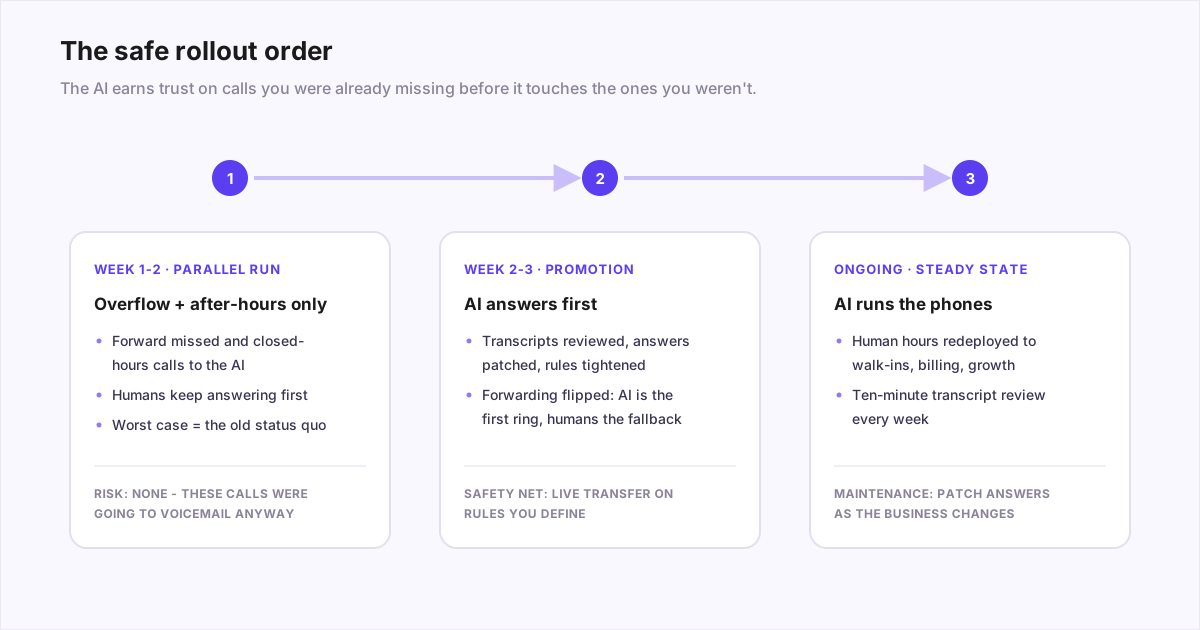
- Route the safe calls first. Keep your existing phone number and forward only unanswered and after-hours calls. The AI now catches what you were losing anyway - the downside risk is zero by construction.
- Read the transcripts. Every platform worth using shows you calls. Ten minutes a day for the first week: mark wrong answers, patch the knowledge, tighten the rules.
- Promote to first answerer. Once the transcripts look right, flip forwarding so the AI answers first and humans are the escalation path - the same setup, inverted.
- Redeploy the human hours.Whether that's walk-ins, billing, marketing, or not making a hire you'd budgeted - decide deliberately, because this line is where the actual return lives.
Why the parallel run matters
The overflow-first stage isn't caution theatre - it's the cheapest A/B test you'll ever run. For a week or two, every call the AI touches is a call that would have hit voicemail, and voicemail loses: the lead-response research in Harvard Business Review shows caller intent decays in minutes, not hours. So during the parallel run you get a clean read on three questions: does it answer accurately, do callers complete their task, and does it escalate the right ones? You're comparing the AI against your worst channel first, and only promoting it to compete with your best.
The honest math
The headline comparison is stark: median receptionist pay is about $37,000 a year plus taxes and benefits, against $30-$300 a month for software - the full breakdown is in our pricing guide. But run your own numbers honestly, because the real figure depends on which scenario you're in:
- Avoiding a hire:the clearest case - you get phone coverage for one to ten percent of the salary you didn't spend.
- Reassigning a person: savings show up as recovered hours and captured calls, not payroll - which is still real money if the phone was eating half their day.
- Extending coverage: nights, weekends, and overflow you never staffed - here the return is new revenue, and you can estimate it with our cost-of-a-missed-call math.
Mistakes that sink the transition
- The hard cutover. Letting a person go and switching the same week gives you no baseline, no fallback, and a team primed to blame the tool for every hiccup.
- Skipping the knowledge work. An AI configured in five minutes answers like it. Garbage in, embarrassment out.
- No escalation path.The fastest way to generate angry callers is an AI that can't hand off. Configure the transfer before the first live call.
- Never reading transcripts.The AI won't tell you it's wrong; the transcripts will. Weekly review is the maintenance contract.
- Automating the wrong half.If your front desk's real value is in-person, replace the phone and keep the person - the audit from step zero exists to catch exactly this.
When you shouldn't replace anyone
Against our own commercial interest: an AI receptionist is the wrong tool if your call volume is tiny and you genuinely answer every call yourself - the problem it solves doesn't exist yet. It's a poor fit if nearly every call is high-stakes, emotional or deeply non-standard, where the value isthe human on the line. And if you can't commit to a working escalation path, don't deploy one at all: an AI that traps callers with no way to reach a person does more damage than a missed call.
The bottom line
Replacing a front desk receptionist with AI works when you treat it as a migration, not a swap: split the role into phone work and person work, move the phone work in stages with a human fallback at every step, and let transcripts - not marketing - decide when the AI is ready for the front line. Done that way, the transition is boring, which is the highest compliment an operational change can get.
The two-week overflow test costs almost nothing to start: you can hear our AI receptionist handle a call right now, check the flat monthly pricing, and have it catching your missed calls this afternoon - while your front desk, human or not, keeps doing everything else.
Frequently asked questions
Can an AI receptionist replace a human receptionist?
It can replace the phone side of the job - answering, routing, booking, message-taking, FAQs - and it can't replace the physical side: greeting walk-ins, handling paperwork and deliveries, managing the waiting room, reading a distressed visitor. Even on the phone it is weaker than a good person on emotional calls, genuine edge cases that need judgment, and bad audio. Businesses whose front desk is mostly a phone role can hand most of it to AI with a human escalation path behind it. Businesses with real foot traffic usually land on a hybrid: AI takes the calls, and the human at the desk focuses on the people in front of them.
Will AI replace receptionists as a job?
Partially, and unevenly. The phone-heavy part of the role - answering, booking, message-taking - is already being automated, and businesses that would have hired for the phones increasingly buy software instead. But the receptionist job was never only the phone: greeting walk-ins, paperwork, payments, and reading the person at the counter don't automate with a voice agent. The realistic shift is fewer pure phone-answering roles and front desks that focus on the in-person half, not the disappearance of front desks.
How long does it take to switch to an AI receptionist?
Setup is fast - most platforms have you live in under an hour, since it's mostly telling the AI about your business and forwarding a number. The transition deserves more patience: a sensible rollout runs the AI on overflow and after-hours calls for a week or two while you read transcripts and fix its answers, then expands it to first-line answering once you trust it. Count on one to three weeks from signup to the AI being your default answerer, with a human safety net behind it.
What happens to calls the AI can't handle?
You define that before it ever happens. Good platforms let you set escalation rules: transfer to a person mid-call, take a structured message and text it to you, or flag the call for callback. The AI applies those rules identically on every call, so a confused or urgent caller reaches a human instead of hitting a dead end. This safety net is the single most important thing to configure and test - it's the difference between automation and abandonment.
How much does replacing a receptionist with AI actually save?
A full-time receptionist costs a salary plus taxes and benefits - U.S. median pay is around $37,000 a year before those extras - while an AI receptionist runs $30-$300 a month, roughly one to ten percent of that. But the honest comparison depends on your situation: if your receptionist also does billing, paperwork, and walk-ins, you're not eliminating the role, you're taking the phone off their plate. The clearest savings come from avoiding a new hire, covering nights without overtime, and capturing the missed calls that were already costing you revenue.
Will callers know - or mind - that they're talking to an AI?
On a short routine booking call many won't notice, but some will, especially on complex or emotional calls, and a few simply dislike machines. The wrong move is pretending. The right move is a brief, natural disclosure early in the call, an AI that answers immediately instead of holding, and one that actually finishes the task - books the slot, answers the question, takes the message. Callers judge the experience, not the technology: reaching a competent AI on the first ring beats reaching a voicemail box or a hold queue every time. Offering an easy path to a human for those who want one removes most of the remaining friction.