
"24 hour answering service" sounds like one product, but it's really a question: who, exactly, picks up your phone at 3 a.m., and what does that hour cost? At a live service it's usually a smaller overnight crew billing premium minutes. At an AI service it's the same software that answered at noon, at the same price. We build AI phone agents, so we have a side here - but the overnight staffing economics below are checkable with any vendor, and we'd rather you check them than take our word.
Our articles are still written by humans!
Get human written articles in your Google feed.
The short answer
A 24 hour answering service makes sure every call to your business reaches a voice - live operator or AI - at any hour, every day of the year. An after-hours answering service is the narrower version: it covers only the hours you're closed - evenings, nights, weekends, holidays - and hands the line back to your team at opening. The real decision isn't whether to have one; for any business with urgent or after-hours demand, the case is straightforward. The decision is the model. Live services charge per minute and charge most at night; AI services charge a flat monthly rate that ignores the clock; and the hybrid - AI answering everything, a human waking only for true emergencies - is what most small businesses actually want. The rest of this guide is the honest detail behind that sentence, including the escalation rules that make the hybrid safe.
What "24 hour" actually means at a live service
Live answering services do genuinely answer around the clock - but the 3 a.m. version of the service is not the 3 p.m. version, and it's worth knowing why before you compare prices:
- Overnight runs on a skeleton crew.Staffing a call centre at 3 a.m. is expensive, so most services keep a small overnight team shared across hundreds of client accounts. Your call still gets answered - by whoever is free, whenever they're free.
- Holds stretch at night.Fewer operators plus bursty overnight volume (storms, cold snaps, holiday weekends) means the hours you bought the service for are the hours it's most likely to put callers on hold.
- The expensive minutes are the ones you wanted. After-hours and holiday minutes commonly bill at premium rates, and some services add flat holiday surcharges. A quiet month looks cheap; the stormy night that made the service worth having produces the invoice that makes you wince.
- Overnight operators mostly take messages. The night crew rarely has access to your calendar or the training to answer detailed questions about your business. The typical output of an overnight live call is a relayed message, not a finished job.
None of this is a scandal - it's just the economics of paying humans to be awake. Per U.S. Bureau of Labor Statistics figures, a single receptionist salary runs tens of thousands of dollars a year for roughly 40 hours a week; covering all 168 hours with people takes four-plus salaries before night differentials. Every live service's overnight pricing is downstream of that arithmetic.
After-hours only: covering nights and weekends
Plenty of businesses don't need a service answering at 11 a.m. on a Tuesday - their team does that. What they need is an after-hours answering service: something that picks up from close to open and on weekends and holidays. It's a bigger slice of the week than it sounds.
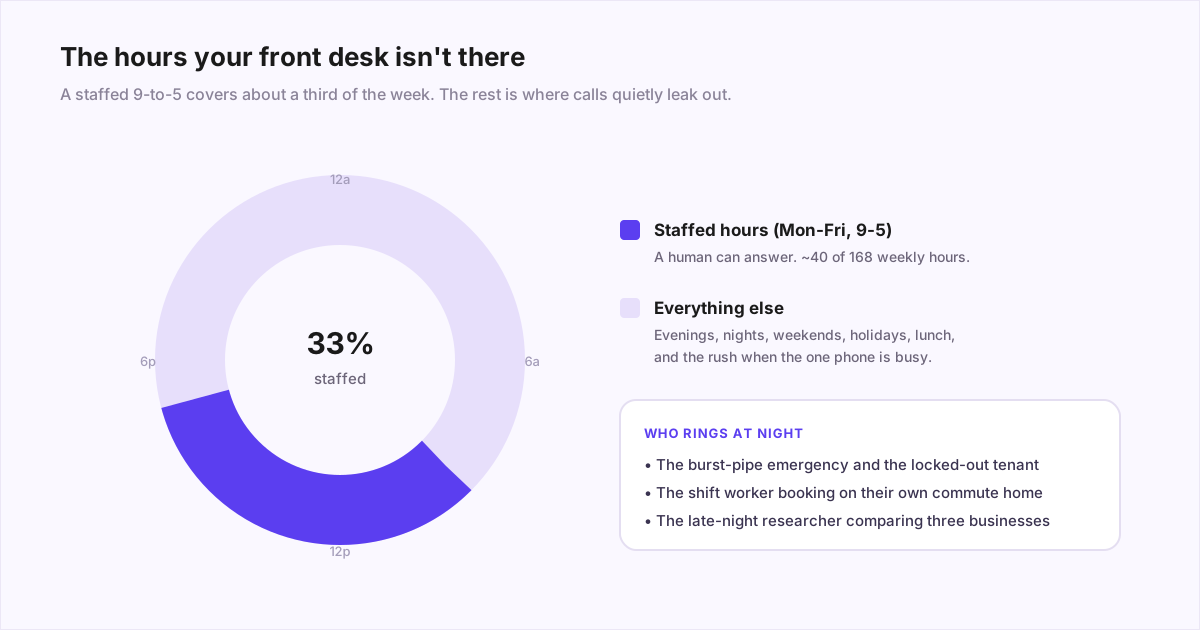
Two kinds of caller fill those hours. The first has an emergency - the burst pipe, the lockout - and will keep dialling until someone picks up. The second simply can only call after their own workday: the person booking a cleaning on Sunday afternoon, or the client who finally has a free minute at 7 p.m. Neither narrates their problem to a beep. Classic lead-response research, captured in Harvard Business Review's write-up, found the odds of qualifying a lead fall off sharply within minutes of first contact - so "we'll call you back Monday" isn't a slow response after hours, it's a forfeit.
What an after-hours service has to do
Underneath the label, an after-hours service does some combination of four jobs. What separates the cheap from the useful is how many it actually completes rather than punting to you the next morning:
- Answer- a voice picks up so the caller doesn't immediately redial a competitor.
- Inform - hours, location, whether you handle their kind of problem.
- Book or capture- the appointment on your calendar, or a structured message with the details you'd actually need.
- Triage and escalate - deciding whether this call warrants waking your on-call person or can wait until you open. This is the hard one, and it gets its own section below.
What after-hours answering costs
The after-hours question changes the cost picture more than people expect. With time-based forwarding you only send the service your closed-hours calls - but at a live service those are precisely the minutes most likely to carry night, weekend, and holiday premiums on top of the typical $1-$2 per minute. With an AI receptionist the flat monthly fee is the same whether it covers nights only or the whole clock, which is why after-hours is usually the first job owners hand to software.
After-hours coverage options and how they bill
| Option | Can it book / triage? | After-hours cost behaviour | Best for |
|---|---|---|---|
| Voicemail | No - records a message most callers won't leave | Free | Businesses whose after-hours callers have nowhere else to go (few do) |
| Live answering service | Takes messages; rarely books; basic emergency dispatch | Per-minute, often with night/holiday premiums | Low after-hours volume where a human voice is required by policy |
| Overnight staff / on-call human | Yes, fully | Highest - overtime, night differentials, or a retainer | High-stakes, emotional, or complex emergency calls |
| AI receptionist | Yes - answers, books, triages, escalates on rules you set | Flat monthly fee; 2 a.m. costs the same as 2 p.m. | Routine volume and the bulk of after-hours calls |
Not every business needs this, and it's worth being honest about that. A standard 9-to-5 office whose after-hours calls are occasional and never time-sensitive may be fine with a good voicemail-to-text. Coverage earns its keep when calls are urgent, bookable, or come from people who can only phone outside their own working day. To put a dollar figure on what the closed hours are already costing you, run the numbers in our cost of a missed call breakdown.
Who actually calls overnight
Overnight volume is low but unusually valuable, because almost nobody calls a business at 2 a.m. idly. The mix varies by industry:
What the overnight phone carries, by industry
| Industry | Typical overnight call | Why it can't wait |
|---|---|---|
| Medical, dental, veterinary | Worsening symptoms, post-op concerns, urgent reschedules | Health anxiety doesn't keep office hours; callers dial until someone answers |
| Trades (plumbing, HVAC, electrical) | Burst pipe, no heat in winter, power out | The emergency is active - first company to answer usually gets the job |
| Property management | Lockouts, leaks, alarms, no hot water | Tenants expect a response, and small leaks become big claims by morning |
| Legal (criminal, family, injury) | An arrest, an accident, a crisis at home | The first firm to answer often signs the client; the stakes are personal |
Two things are true of nearly all of these callers: they are the most motivated contacts you'll get all week, and they are the least willing to wait - at 2 a.m. with an active emergency, the response window is tighter still. For a worked example of what this looks like in one vertical, our property management answering guide walks the overnight tenant-call problem end to end, and the apartment answering service guide does the on-site leasing-office version, where the same line carries evening prospects and 2 a.m. burst pipes.
Live vs. AI vs. hybrid at night
Here's the overnight comparison laid out plainly. The structural point to hold onto: live coverage is priced by the hour of the day, and overnight is the most expensive shift there is. AI is priced by the month, and the software neither knows nor cares what time it is.
What overnight coverage costs, by model
| Model | Who answers at 3 a.m. | Overnight cost behaviour | Watch out for |
|---|---|---|---|
| Live answering service | A smaller overnight crew at a shared call centre | Per-minute ($1-$2 typical), often with night and holiday premiums | Longer holds at night; surcharges on exactly the nights you need it |
| In-house overnight staff | Your own employee, awake so you aren't | Salary plus night differentials - the most expensive shift you can buy | One person, one call at a time; sick days happen at midnight too |
| AI receptionist | Software - identical behaviour at 3 a.m. and 3 p.m. | Flat monthly fee ($30-$300 typical); no night or holiday premium | Needs explicit escalation rules for calls requiring human judgment |
| Hybrid: AI + on-call human | AI answers everything; a human wakes only for emergencies | Flat fee plus on-call rotation goodwill | The escalation rules must be written and tested, not assumed |
For most small businesses the hybrid row is the answer: it combines AI's flat-rate, instant-answer coverage with human judgment held in reserve for the calls that genuinely need it. We've put the full pricing math - per-minute traps, minimum commitments, what a realistic monthly bill looks like under each model - in our answering service cost breakdown, and our own flat monthly pricingis public if you want a concrete number for the AI column. If you're still sorting out which kind of service is which, our AI vs. virtual receptionist vs. answering service comparison untangles the labels. Whichever column you pick, the switch itself is one forwarding code - here are the carrier codes and the rule to choose.
The features that matter at 3 a.m.
Round-the-clock answering is table stakes; what separates a 24 hour answering service you keep from one you cancel is what happens after the pickup. Three capabilities do almost all the work:
- Escalation to an on-call human. When a genuine emergency comes in, the service must be able to reach a real person on your side - warm transfer, direct dial, or a priority text that actually wakes someone. Ask any vendor to demonstrate the handoff, not describe it.
- Urgency triage. The inverse skill: correctly not escalating. A service that wakes you for every call is worse than voicemail, and one that sleeps through the burst pipe is a liability. Good triage runs on rules you define - specific situations, specific actions - applied identically on every call.
- Message-taking quality.The overnight calls that don't escalate should produce structured, complete messages: name, callback number, address if relevant, the actual problem, and the caller's own urgency assessment. "John called, wants a callback" at 6 a.m. is a failure dressed as a message.
How to set up emergency call escalation
Every after-hours greeting eventually promises if this is an emergency, we'll get someone to you.Almost nobody writes down what happens next - and when an escalation fails at 2 a.m. it is almost never because the software broke. An escalation policy is five things written down. Your answering service or AI receptionist executes it; you own it. (If you only want the conceptual version - can an AI do this at all - that is answered here.)
What every escalation policy has to specify
| Part | The question it answers | Common failure |
|---|---|---|
| Trigger | What counts as an emergency, and what explicitly does not | A keyword list, or nothing written down at all |
| Target | Who is on call for this window, and how they are reached | A name with no calendar, or a phone in Do Not Disturb |
| Timer | How long before this moves to the next person | Timers that don't fit inside the promise made to the caller |
| Fallback | The full ladder, ending somewhere that always answers | A ladder with one rung, or a last rung that is a voicemail box |
| Caller contract | What the caller is told and when they hear back | A vague 'someone will call you' with no time and no confirmation |
1. Write trigger rules as conditions, not keywords
The instinct is to hand over a list of words - emergency, urgent, flooding, ASAP. It fails in both directions. "This is an emergency, my garbage disposal is jammed" is a sincere sentence and a three-word trigger; wake a tech twice for that and they start ignoring the pager - the pager-fatigue dynamic documented in Google's SRE book chapter on being on-call, which is about servers but describes human beings. Meanwhile a calm caller saying "there's water coming through the ceiling and I can hear it running" uses none of the trigger words and is the worst call of the night. Write three lists instead, on one page:
- Always escalate. Situations, in the language a caller would actually use: water running that cannot be stopped; no heat with outside temperatures below a number you name; no power to the whole property; sewage backing up; a smell of gas; anyone hurt; a door that will not lock.
- Never escalate.Equally explicit: cosmetic damage, one appliance, one outlet, noise complaints, billing questions, scheduling, "can someone come look at it this week." This list is what keeps your on-call person willing to stay on call.
- Ask one question, then decide.The middle band. "No hot water" is a Monday problem in a house and an emergency in a twelve-unit building; "the AC is out" is a Monday problem in April and an emergency in a heat advisory with an elderly resident. Write the disambiguating question rather than guessing the answer.
This is prompt work, and the general craft of it - being specific, bounding the model, writing what not to do - is in our guide to AI receptionist prompts. The "always escalate" list differs by business; broad strokes:
Emergency triggers by business type
| Business | Always escalate | Deeper detail |
|---|---|---|
| Plumbing | Uncontrolled water, sewage backup, no water to the property, water heater leaking | Plumbing answering |
| HVAC | No heat or no cooling in extreme weather, gas smell, carbon monoxide alarm | HVAC answering |
| Electrical | Burning smell, sparking, panel hot to touch, total power loss, exposed conductor | Electrician answering |
| Apartments and property management | Active leak, no heat, no power, sewage, broken exterior door or lock, elevator entrapment | Apartment answering service |
| Medical and dental | Post-op bleeding, severe pain, medication reaction, anything the clinician's protocol names | Medical answering service |
| Veterinary | Trauma, seizures, bloat, toxin ingestion, labored breathing | Veterinary answering service |
| Towing and roadside | Caller in a live traffic lane, accident scene, anyone in the vehicle at risk | Towing answering service |
The water damage restoration and home care guides show the escalation triggers those operators write down, too.
2. Build the on-call ladder and set the timers
A ladder is a sequence of targets with a timer between each. The shape that works for most small operations:
A three-rung ladder inside a fifteen-minute promise
| Rung | Target | Timer | Method |
|---|---|---|---|
| 1 | On-call tech for this window | 4 minutes | Live transfer attempt, then a call with an acknowledgement prompt |
| 2 | Second on-call / lead tech | 4 minutes | Call plus SMS with the full summary |
| 3 | Owner or manager | Until answered | Call, repeated - the last rung is a person, never a mailbox |
Work backwards from the promise: if the caller was told fifteen minutes, the whole ladder has to finish inside fifteen minutes with room for the callback - three ten-minute rungs cannot fit. The last rung must be a human, not a voicemail box; a ladder that ends in a mailbox ends in nothing. And keep escalating in parallel, not instead: when the ladder moves on, the previous rung should still be able to pick up.
3. Warm transfer vs. paged callback
Transfer live when the on-call person is reachable and the situation benefits from talking - a caller standing next to a leak needs to be told which valve to close. Page with a full summary when they aren't reachable or when the details matter more than the conversation, so your tech wakes up already knowing the address, the problem, and the callback number instead of dialing into a cold call. The robust default does both: attempt the transfer, fall back to the paged summary, keep climbing the ladder. The mechanics of the handoff itself are covered in how an AI receptionist transfers calls to a human.
4. Escalate on silence, not on "no answer"
The fix is to define delivery as an explicit acknowledgement, not a connected call: press 1 to accept, reply YES, tap the notification. Anything else - answered and silent, declined, voicemail, no answer - is a failure and the timer keeps running. Its close cousin is the phone itself: iOS Focus modes and Android Do Not Disturb will silence your paging number by default, so add the paging number as an emergency-bypass or favorite contact on every on-call phone and confirm it with a real test call while the phone is silenced.
5. An on-call rotation people will actually keep
- One owner per window."Whoever's around" means nobody. A window has exactly one name and exactly one backup.
- A published calendar, not a group chat.If the schedule lives in someone's head or a three-week-old message, it is wrong by now.
- An explicit handoff. The outgoing person says what is still open. Rotations fail at the seam more than in the middle.
- Protect the load.The SRE literature's core finding transfers cleanly: people woken too often stop responding well, and the fix is fewer false pages, not more discipline.
- Pay for it, visibly. A stipend for the window turns on-call from an imposition into a shift.
6. The 911 boundary
An automated system must never attempt to place a 911 call on a caller's behalf. Emergency calls are routed to a dispatch center based on the calling device's validated location - the FCC calls this dispatchable location, the street address plus the suite or apartment needed to find the caller. A call placed by your phone system carries your phone system's registered location, so it reaches the wrong dispatch center with the wrong address. The correct script, in every trade: tell the caller to hang up and dial 911 now, say nothing else that keeps them on the line, and log the call. For a gas smell, add "get outside first, and call from outside."
Related and easy to break while rewiring routing for after-hours coverage: under Kari's Law, a multi-line telephone system in the US must let anyone dial 911 directly, without a 9 prefix or other code, and must notify a front desk or equivalent when someone does. The FCC's MLTS requirements page is the authority.
7. Close the loop with the caller
Half of what people describe as "the emergency was handled badly" is actually "nobody told me anything." Say the time out loud- "our on-call technician is being paged now and will call you within fifteen minutes" - then keep it. Text the confirmation: what was reported, who is coming, what to do meanwhile (shut the valve, kill the breaker, stay out of the room). And give them the escape hatch: anyone who asks for a person gets one, and the script decides explicitly what happens when the assistant is out of its depth.
8. Test it - including the 2 a.m. drill - and tune it
- Describe a real emergencyin a caller's words, without saying "emergency." It should escalate anyway.
- Describe something trivial while insisting it is urgent. It should not escalate.
- Let rung one ignore the page. Time the ladder; confirm rung two fires and rung one can still pick up.
- Answer the page and say nothing. The ladder must keep going. If it stops, you are escalating on connection rather than acknowledgement - fix that first.
- Run one drill at 2 a.m. with phones in their real overnight state - Focus on, chargers across the room. It is the only test that tells you the truth.
- Test the 911 script.Say "I smell gas." The response should be short, immediate, and end the call.
Then review weekly for the first month, monthly after. Track two numbers, because only one of them complains. False escalations- techs woken for something that could have waited - you will hear about; each is a missing "never escalate" entry or disambiguating question. Missed escalations nobody reports, so audit a sample of non-escalated overnight calls deliberately. A trigger list with zero false escalations is almost certainly missing real ones. Watch acknowledgement time too: if rung one routinely acknowledges at three and a half minutes on a four-minute timer, luck is holding the ladder together.
What a good overnight call sounds like
Abstract feature lists hide what this actually feels like, so here are two condensed overnight calls - one routine, one emergency - the way a well-configured AI receptionist handles them.
1:40 a.m., HVAC company - routine. No one is woken; the caller gets a confirmed slot instead of a voicemail beep:
Caller:"Our AC is making a rattling noise. Not an emergency - it's still cooling - but I'd like someone to look at it."
AI:"Glad it's still running. I can book a technician - tomorrow we have 9:30 or 1 p.m. open. Which suits?"
Caller:"9:30."
AI:"Done - 9:30 tomorrow at your address on file, and I've noted the rattling for the technician. You'll get a text confirmation now."
3:15 a.m., property management - emergency. The escalation rule fires and a human joins in under a minute:
AI:"That's an emergency and I'll get our on-call maintenance lead on the line. First - which building and unit, and is water reaching any outlets or lights?"
Caller:"Oakwood, unit 4B. No, just the ceiling and floor."
AI:"Thank you. If it reaches any electrical fixture, shut off the room's power if you can do so safely. Connecting you now - stay on the line."
Note what made the second call work: the AI didn't diagnose anything, and the caller never said the word "emergency." It matched a condition from the always-escalate list, captured the two facts the on-call human would need, gave one safe holding instruction, and got out of the way.
Where AI loses at night
Vendor honesty section. There are overnight calls where an AI - ours included - is the wrong first voice:
- True crises needing human judgment.A distressed or frightened caller, a medical situation that's ambiguous, a death in the family reaching a funeral home. These calls need human presence from the first second, not after an escalation hop.
- Judgment calls with no clean rule.Triage rules cover the situations you predicted. The overnight call that fits no rule - strange, partial, alarming but unclear - is where an experienced human operator's instinct beats pattern-matching. The mitigation is to make ambiguity itself a rule: when unsure, escalate. A false alarm costs minutes; the opposite mistake costs more.
- Callers who refuse to talk to a machine. A small but real share of overnight callers, often older, will hang up on any AI voice. If your customer base skews that way, a live service or a very fast human fallback matters more than any feature.
If your overnight calls are mostly in this territory - hospice care, crisis lines, high-emotion legal intake - a staffed live service is the right spend despite the premiums. For everyone else, these cases are the reason the hybrid exists: AI for the volume, humans for the exceptions, with the escalation rule biased toward waking someone.
Setting it up without touching your daytime flow
A common worry is that adding 24 hour or after-hours coverage means re-plumbing the phones your team uses all day. It doesn't - the standard rollout leaves daytime completely alone:
- Find your after-hours pattern. Pull a month of call logs and mark which came in outside business hours. Owners are usually surprised by the volume, and by how many of those callers never called back.
- Keep daytime exactly as it is. Your team answers 9-to-5 the way it always has. The service only exists outside those hours at first.
- Forward on a schedule.Set conditional call forwarding so calls route to the service after close and back to you at open. Every carrier and VoIP system supports this; it's a settings change, not a migration.
- Write the overnight rules. Your three trigger lists, the ladder with acknowledgement, and where routine messages land (email, SMS, your CRM) - the specification in the escalation section above. Decide what routine calls should accomplish, too: the more they can book or answer, the less morning cleanup you inherit.
- Test at night, from your own phone.Routine call, then emergency, then the 2 a.m. drill. Confirm the booking lands, the message is complete, and the right phone rings - and the wrong one doesn't.
- Review a week of transcripts, then decide about daytime. Once overnight runs clean, many owners extend the same service to daytime overflow - the calls that ring while staff are busy. That larger always-on setup is its own topic, covered in our 24/7 AI receptionist guide.
If you want to hear the 3 a.m. answer for yourself before configuring anything, you can talk to our AI receptionist now- it's the same agent, at the same flat rate, at every hour on the clock. Our plans run month-to-month, so you can test a full escalation ladder on real calls before committing to anything.
Frequently asked questions
How much does a 24 hour answering service cost?
Live 24 hour answering services bill per minute, typically $1-$2, and many add premiums for overnight, weekend, and holiday minutes - so a busy month of round-the-clock coverage commonly runs several hundred to over a thousand dollars. AI answering services charge a flat monthly subscription, usually $30-$300 depending on call volume, and the price is identical whether the call arrives at 3 p.m. or 3 a.m. In-house overnight staff is the most expensive option of all once night differentials are added. Always ask a live service for its after-hours and holiday rate card before signing.
How much does an after-hours answering service cost?
If you only forward calls outside business hours, you only pay for those calls - but at a live service those are exactly the minutes most likely to carry night, weekend, or holiday premiums on top of the typical $1-$2 per minute, so a stormy weekend can produce a surprising invoice. An AI receptionist charges the same flat monthly fee (commonly $30-$300) whether it covers only nights or the whole clock. Voicemail is free but loses most of the callers it was meant to catch; hiring overnight staff is the most expensive option by far.
Do 24/7 answering services use real people overnight?
Usually yes, but fewer of them. Most live answering services run a smaller overnight crew shared across many client accounts, which is why hold times often stretch at night and why after-hours minutes frequently bill at premium rates. Some services quietly route overnight calls to voicemail-style message capture or an offshore centre. Before signing, ask directly: how many operators are on between midnight and 6 a.m., and what is the average overnight answer time?
What businesses need a 24 hour answering service?
Any business whose calls are urgent or whose customers phone outside office hours: plumbers, HVAC and electrical contractors, property managers, locksmiths, medical and dental practices, veterinary clinics, law firms handling arrests or injuries, and funeral homes. The test is simple - if an overnight caller with a real problem would dial your competitor rather than leave a voicemail, you need round-the-clock answering. If your after-hours calls are rare and never urgent, a good voicemail may genuinely suffice.
Is voicemail good enough after hours?
Only if your after-hours callers have nowhere else to go, and few do. Most people calling a business at night have an immediate need, and the majority won't leave a message - they hang up and dial the next listing that answers. Voicemail records the calls you lost; it doesn't keep them. For any business with urgent or bookable after-hours demand, something that actually answers - human or AI - pays for itself quickly.
Can an AI answer calls overnight and escalate emergencies?
Yes - this is the job AI answering does best. The AI picks up instantly at any hour, answers routine questions, books appointments, and takes structured messages. For emergencies, you describe the qualifying situations in plain language - water running that can't be stopped, no heat below a temperature you name, a lockout - rather than a keyword list, plus an explicit list of things that are never emergencies. When a call matches, the AI warm-transfers or pages your on-call person immediately; everything else waits politely until morning.
What is emergency call escalation?
It is the rule set that decides which after-hours calls wake someone up and how. A caller reaches your answering service or AI receptionist, the call is classified against triggers you wrote, and anything that qualifies gets pushed to your on-call person - by call, text, or push - with a timer. If they do not acknowledge within that timer, it moves to the next person on the ladder. Everything that does not qualify gets captured as a normal message or work order for the morning.
Should an emergency call be warm-transferred or called back?
Transfer live when the on-call person is reachable and the situation benefits from talking - a caller standing next to a leak needs to be told which valve to close. Page with a full summary when they are not reachable or when the details matter more than the conversation, so your tech wakes up already knowing the address, the problem, and the callback number. Most good setups do both: attempt the transfer, fall back to a paged summary, and keep escalating until someone explicitly acknowledges.
Can an AI receptionist call 911 for a caller?
No, and it should never try. Emergency calls are routed to a dispatch center based on the calling device's validated location, so a call placed by a phone system reaches the wrong dispatch center with the wrong address. The only correct behavior for fire, gas smell, injury, or any life-safety situation is to tell the caller to hang up and dial 911 themselves, immediately, and to stop working the script.
Why do escalations get missed even when everything is configured?
Almost always one of three reasons. Focus mode or Do Not Disturb silenced the page - fix it by adding the paging number as an emergency-bypass contact on every on-call phone. The system escalated on 'no answer' but the tech answered, mumbled, and went back to sleep - fix it by requiring an explicit acknowledgement. Or the rotation calendar says a name that is on a plane - fix it with a published calendar and a real handoff. Configuration is rarely the failure; the human layer around it usually is.
Sources
- Harvard Business Review: The Short Life of Online Sales Leads (lead response-time research by James Oldroyd)
- U.S. Bureau of Labor Statistics: Receptionists, Occupational Outlook Handbook (median pay)
- Google SRE Book, chapter 11: Being On-Call (on-call load, pager fatigue and escalation practice)
- FCC: Dispatchable Location for 911 Calls from Fixed Telephony, Interconnected VoIP and Mobile Services
- FCC: Multi-line Telephone Systems - Kari's Law and RAY BAUM'S Act 911 direct dialing and dispatchable location requirements